
Basic concepts on ReactJS

Props and State.

  • Props and state are the two basic ways to handle data in ReactJS. 
  • Props are used to pass data and behaviors from container components to child components.
  • Props are read only.
  • State is used to keep data which can be updated.
  • State is read write enabled.

State.

State is basically available through  'this.state', which is by default is null. Whenever the state changes on a component the component will  automatically re-render and update DOM (Document Object Model) if there are any changes else the DOM will not get touched at all.
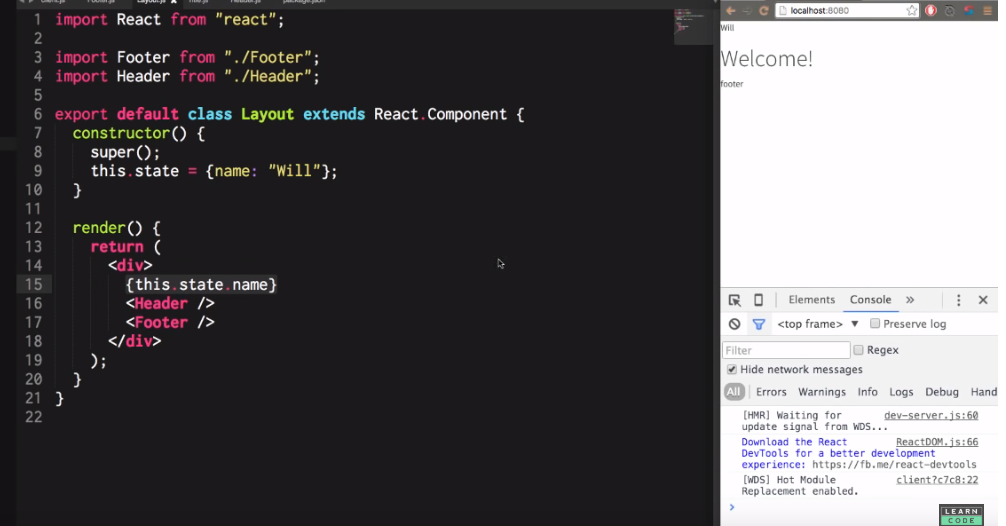
Using state.

To change the state setState() method can be used. Since setTimeOut() method is used in the bellow example after a second (1000ms)  'Will'  will be changed to  'Bob'. 

Changing the state using  'setState()'

If the component has an internal value that does not effect the application state is appropriate. A side from that props can be used.

Props.

Props are injected to every other component.

Babel.

  • Most popular JavaScript transpiler.
  • Convert JavaScript es6 features and beyond to latest compatible version.
  • Babel polyfills are available to support new global objects. It uses core-js polyfills.
  • So far Babel compatibility with new features has been one of the best.
  • Debugging enabled via source maps.
  • In built code optimization.
  • Supports JSX (XML like syntax extension) and FLOW (Static type checker).

Webpack.

  • Most famous module bundler.
  • Support for build system as well as module bundling.
  • Split code into multiple files.
  • Supports CommonJS and AMD.
  • Extend using loaders (transpiling, css transformation, image optimization).
  • Supports production optimizations (minification, uglification).
  • Easy configuration with 4 steps - entry -> loaders -> plugins -> output.

Comments

Popular posts from this blog

What is ExpressJS

Express is a very popular framework that is used in NodeJs. Express is build upon NodeJs and also it provides a lot of tools that makes node more easy to use by adding more functionalities. Most of the needed functionalities are handled by express which helps the users to only focus on the business logic and to easily setup routes and to render the things on screen in a fast, optimized and a secured manner. How to install ExpressJS? Express can be easily installed by the command  " npm i express"  . Installation of ExpressJs package.json file will be updated once the installation is successful. How to import ExpressJS? To import the installed express module we can use the command  " require("express") " . Accessing the imported express module. express can be accessed as given below using the given commands. Firstly a constant called app is created. And then using this give constant app ...

Introduction to ReactJS

React is an open source front-end (JavaScript) library developed  and maintained by Facebook and Instagram for building fast and interactive user interfaces. Why ReactJS? In 2009 Facebook was using traditional data flow as the back-end. Therefore to get new updates the entire page had to be reloaded. In terms of initial data, real-time data and user data was flowing from different sources. Then the data was accordingly passed to the dispatcher, store and ultimately view. If there was any changes in the back-end in order  to reflect the changes on the view the entire  page had to be refreshed. This was not user-friendly. Drawbacks of traditional data flow. Uses DOM (Document Object Model). More memory consumption. Slow performance. With use of React the entire application is divided in to various components. When new data is added it will automatically update that component whose state has actually changed without reloading the entire pa...